
Interfaces as the Primary Bottleneck for AI in Product Design
AI is Coming but CAD/CAM Vendors Still Struggle Using it to Help Customers

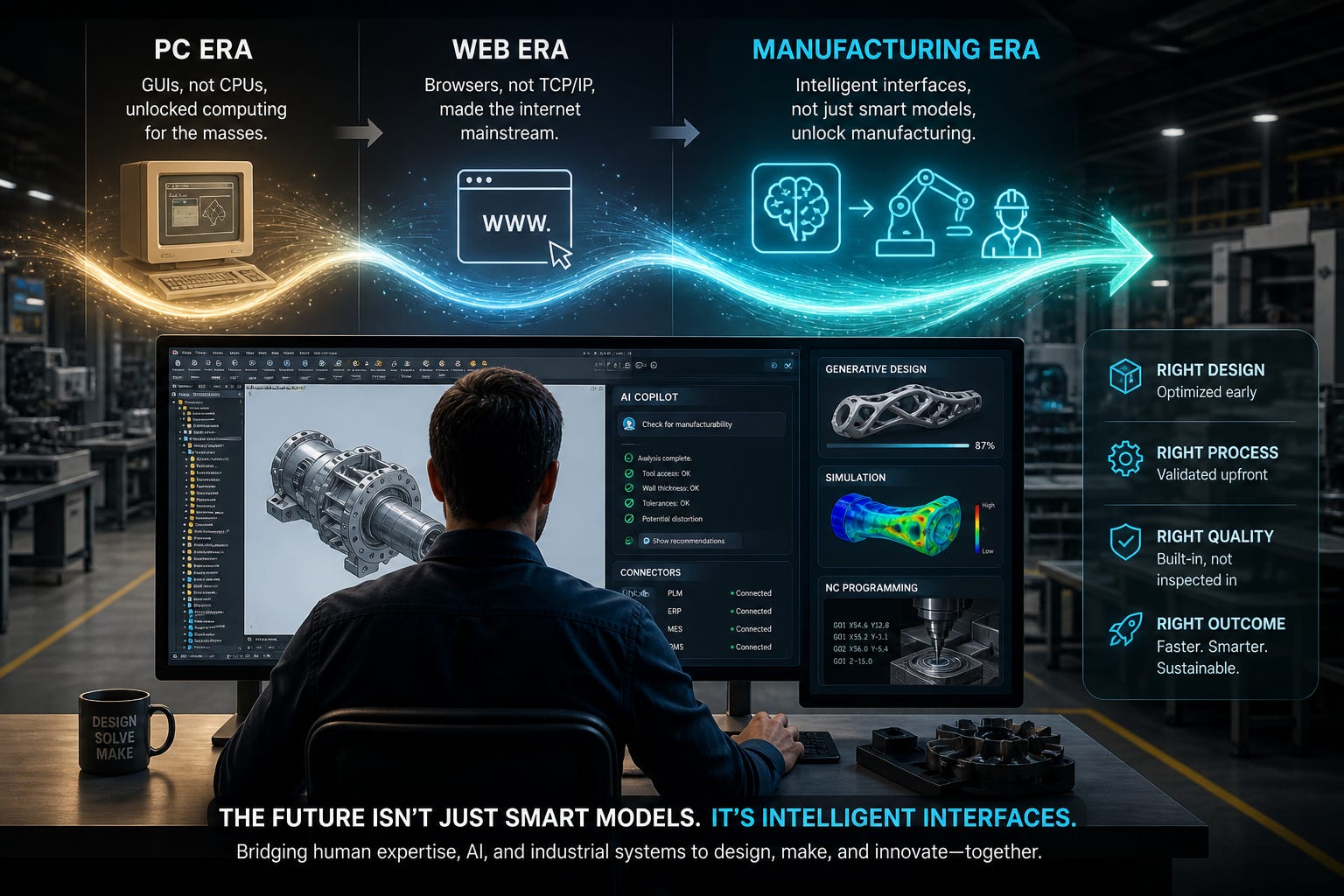
Over the last five years, AI models have reached a point where they can propose manufacturable geometries, auto‑constrain sketches, optimize lattices, and surface relevant PLM data on demand. In most engineering organizations, adoption remains sporadic and impact uneven—not because the models are fundamentally incapable, but because the interfaces between engineers, systems, and models are the binding constraint ([https://www.mckinsey.com/.../pilot-purgatory], [https://dancumberlandlabs.com/.../engineering-firms-ai-adoption], [https://www.mckinsey.com/.../gen-ais-roi]).
This essay argues that for mainstream product design and manufacturing workflows, the primary bottleneck has shifted from model capability to the way AI is surfaced in CAD, PLM, and shop‑floor tools—through UI/UX, APIs, workflow integration, and governance. In safety‑critical or frontier scientific tasks, model reliability still limits automation, but in day‑to‑day engineering, bad interfaces routinely neutralize powerful models ([https://www.nist.gov/.../claude-35-sonnet], [https://hai.stanford.edu/.../responsible-ai]).
1. What “Interface” Means in the Engineering Stack
In human–computer interaction, the “interface” is not just a visual skin but the translation layer between a user’s intent and a system’s internal language: the sequence of actions, feedback, and representations that allow users to form goals, act, and evaluate outcomes ([https://en.wikipedia.org/wiki/The_Design_of_Everyday_Things]). Don Norman’s execution–evaluation model describes gulfs of execution (difficulty turning intent into actions) and evaluation (difficulty interpreting system state); poor interfaces widen these gulfs and directly depress productivity ([http://cs4760.csl.mtu.edu/.../normans-interaction-theory]).
For product design and manufacturing, “interface” spans three layers:
End‑user UI/UX: CAD sketchers, feature trees, simulation setup dialogs, generative‑design wizards, and now AI chat panes and assistants embedded in tools such as CATIA, SOLIDWORKS, Creo, NX, and Fusion 360 ([https://www.3ds.com/.../ai-driven-generative-experiences], [https://help.solidworks.com/.../c_ai_3dexperience.htm], [https://www.autodesk.com/.../fusion-year-in-review-2025])
System interfaces and APIs: PLM, MES, and ERP APIs; file formats; and event hooks that let AI systems see geometry, BOMs, process plans, and quality data in context ([https://news.siemens.com/.../siemens-xcelerator-microsoft-azure], [https://www.ptc.com/.../windchill-ai]).
Workflow and governance interfaces: human‑in‑the‑loop review steps, sign‑off workflows, and escalation paths that determine when an AI suggestion becomes an approved change ([https://www.mckinsey.com/.../pilot-purgatory], [https://executive.mit.edu/.../ai-adoption-merck]).
The core claim is that—given today’s model capabilities—these interfaces, not the raw intelligence of the models, are what most limit throughput, adoption, and realized ROI in product organizations ([https://www.mckinsey.com/.../pilot-purgatory], [https://www.mckinsey.com/.../gen-ais-roi], [https://dancumberlandlabs.com/.../engineering-firms-ai-adoption]).
2. Models Are “Good Enough” for Many Design and Manufacturing Tasks
2.1 Mature generative and optimization engines in CAD
All major CAD/CAM vendors now ship non‑trivial AI capability into production tools. Dassault’s CATIA offers AI‑Driven Generative Experiences, applying generative algorithms to body and chassis structures for topology optimization and structural exploration within the CAD environment ([https://www.3ds.com/.../ai-driven-generative-experiences]). Dassault’s AI functionality catalog for 3DEXPERIENCE documents features such as Sketch Auto Constraint (automatic inference of optimal constraint sets) and Command Intelligence (predictive surfacing of relevant commands) across CATIA and SOLIDWORKS ([https://www.3ds.com/.../ai-based-functionality-intended-purpose]).
Autodesk reports that Fusion 360’s AutoConstrain can detect small geometric issues (tiny gaps, off‑axis lines, near‑tangent arcs) and present a results card with proposed corrections, while drawing automation uses AI to recognize fasteners and intelligently omit them from certain generated views to reduce clutter ([https://www.autodesk.com/.../fusion-year-in-review-2025]). In AutoCAD 2025, an AI‑powered Autodesk Assistant provides conversational, context‑aware support inside the CAD session, targeting common workflows with generative responses and connected documentation ([https://www.autodesk.com/.../autocad-2025]).
PTC’s Creo includes generative topology optimization and a cloud‑based Generative Design Extension (GDX) that accept loads, constraints, protected regions, and manufacturing methods as inputs and generate optimized, manufacturable geometries with parametric histories that engineers can edit ([https://www.ptc.com/.../creo-chapter-12], [https://www.getleo.ai/.../best-ai-tools-creo-2026]). Siemens’ NX combines an AI‑enabled Adaptive User Interface that learns which commands users need and rearranges the interface accordingly with generative and implicit modeling tools that algorithmically create complex structures. Independent vendors such as Neural Concept document similar shape optimization and constraint‑inference capabilities built on top of traditional parametric kernels ([https://www.neuralconcept.com/.../ai-cad-solutions]). Taken together, these offerings show that models can already generate viable geometries, infer constraints, and guide simulation setup for many classes of parts and assemblies.
2.2 Broader evidence from coding and enterprise work
Outside CAD, there is strong quantitative evidence that current models boost productivity when integrated well. A randomized trial on customer support agents using a generative‑AI assistant showed a 14–24 % increase in issues resolved per hour, with the largest gains for less‑experienced agents ([https://arxiv.org/abs/2304.11771]). GitHub’s controlled experiment found that developers using GitHub Copilot in their IDE completed a coding task 55.8 % faster than a control group (1:11 vs. 2:41), using the same underlying model exposed through an inline interface ([https://github.blog/.../copilot-productivity]). McKinsey reports double‑digit revenue contributions from generative AI in functions such as software engineering and service operations among firms that moved beyond pilots and embedded AI into workflows ([https://www.mckinsey.com/.../gen-ais-roi]).
These studies indicate that from a capability perspective, models are already “good enough” to materially accelerate structured knowledge work, including many design and documentation tasks, provided they are reachable through effective interfaces.
3. Where the Bottleneck Really Is: Interfaces in the Product Development Flow
3.1 Fragmented digital thread and limited AI visibility
A 2026 analysis of engineering firms reports that 78 % of respondents believe AI will positively impact operations, but only 27 % actually use AI in their workflows ([https://dancumberlandlabs.com/.../engineering-firms-ai-adoption]). Despite mature CAD and PLM platforms, 52 % still rely on paper during the design phase and 49 % during planning; 42 % cite data‑sharing and security as top challenges ([https://dancumberlandlabs.com/.../engineering-firms-ai-adoption]). When core product data lives in paper markups, Excel sheets, or isolated file servers, AI systems—even powerful ones—cannot “see” enough context to be useful.
McKinsey’s work on digital manufacturing “pilot purgatory” shows similar patterns: companies run numerous analytics and AI pilots, often with promising results, but fail to scale them because tools are not integrated into frontline workflows or existing MES/PLM systems ([https://www.mckinsey.com/.../pilot-purgatory]). In these cases, it is not the optimization algorithm that is constrained, but the interface between AI and the messy reality of design reviews, engineering change processes, and shop‑floor systems.
3.2 CAD UX and the clash between parametric and generative workflows
Most AI features in CAD tools are surfaced as incremental extensions to legacy parametric workflows—new commands, side panels, or wizards—rather than as re‑imagined interactions. Dassault’s Sketch Auto Constraint still expects designers to work in a conventional sketch environment; it automates constraint inference but does not change the interaction paradigm ([https://www.3ds.com/.../ai-based-functionality-intended-purpose]). Autodesk’s Fusion AutoConstrain and drawing‑automation features present their suggestions via cards and dialogs, requiring users to understand geometric tolerances, filter suggestions, and commit changes manually ([https://www.autodesk.com/.../fusion-year-in-review-2025]). PTC’s GTO/GDX workflows require users to define design spaces and manufacturing methods and then interpret families of results, often with little guidance on trade‑offs ([https://www.ptc.com/.../creo-chapter-12], [https://www.getleo.ai/.../best-ai-tools-creo-2026]).
For many engineers, this adds cognitive overhead: they must understand not only traditional CAD operations but also how to parameterize an AI request, interpret multiple candidate designs, and reconcile AI output with downstream manufacturability, safety, and cost constraints. A poor interface can easily turn generative tools into one more opaque wizard that produces “cool parts” that are difficult to audit, certify, or integrate into assemblies.
3.3 Socio‑technical “last mile”: pilots, governance, and trust
Multiple enterprise studies estimate that 80–85 % of AI projects fail to reach production or deliver measurable ROI ([https://caylent.com/.../why-ai-projects-fail], [https://www.linkedin.com/.../ai-projects-fail], [https://www.fullstack.com/.../generative-ai-roi]). Post‑mortems attribute the majority of failures to unclear business objectives, lack of executive sponsorship, inadequate change management, and poor UX and integration—rather than lack of model accuracy ([https://caylent.com/.../why-ai-projects-fail], [https://www.linkedin.com/.../ai-responsibleai], [https://hai.stanford.edu/.../ai-index-2024_ch4.pdf]). MIT Sloan materials on “engineering the last mile of AI” frame the real challenge as moving from models to mindset and metrics: defining how AI outputs are presented to decision‑makers, how they are audited, and how they shape behavior ([https://executive.mit.edu/.../ai-adoption-merck]).
Autodesk’s 2025 State of Design & Make report provides unusually clear evidence of this implementation wall. Globally, only 69 % of business leaders now say AI will enhance their industry, a 12‑point drop from 2024, and trust in AI in their own field has fallen 11 points to 65 %—even as most plan to increase AI investment ([https://www.autodesk.com/.../ai-hype-cycle], [https://adsknews.autodesk.com/.../2025-state-of-design-and-make], [https://www.nti-group.com/.../2025-design-make-report]). In Design & Make industries specifically, just 69 % of leaders in design and manufacturing say AI will enhance their industry, down from 80 % the previous year, while 44 % say AI will destabilize it ([https://www.autodesk.com/.../state-of-design-and-make-2025/industry]). Only 40 % of leaders say they are approaching or have achieved their AI goals, a 16‑point decline, and there is a 37 % year‑over‑year increase in leaders who classify themselves as in the early or middle stages of their AI journey ([https://www.autodesk.com/.../ai-hype-cycle], [https://resources.imaginit.com/.../2025-autodesk-state-of-design]). Autodesk’s own summary frames this as AI moving from “hype to implementation,” with organizations hitting a wall of cost, talent, security, and regulatory complexity—exactly the interface and integration bottleneck this essay describes ([https://www.autodesk.com/.../ai-hype-cycle]).
4. Vendor Trajectories: Concrete Interface Choices
4.1 Dassault Systèmes: AI companions on 3DEXPERIENCE
Dassault has moved beyond isolated AI features to a full suite of SOLIDWORKS Design AI Virtual Companions—AURA, LEO, and MARIE—embedded into the SOLIDWORKS Design environment on the 3DEXPERIENCE platform ([https://www.solidworks.com/.../ai-companions]). AURA is positioned as “the connector and explorer,” using enterprise and web knowledge to summarize specifications, standards, supplier datasheets, test reports, and community content so engineers can extract key tolerances or requirements without scrolling through dozens of pages ([https://www.solidworks.com/.../ai-companions]). LEO acts as “the engineer and builder,” taking prompts from within SOLIDWORKS to generate assembly structures, convert images to mesh, add parametric features to STEP files, run simulation studies, evaluate assemblies, and help resolve design errors ([https://www.solidworks.com/.../ai-companions]). MARIE serves as “the scientist and researcher,” bringing materials science, chemistry, and laboratory analysis expertise into engineering workflows when designs touch unfamiliar domains ([https://www.solidworks.com/.../ai-companions]).
Crucially, Dassault emphasizes that these companions are grounded in the company’s own data—PLM documents, CAD models, standards, and community content—rather than the open web, and that responses are traceable back to internal sources ([https://www.3ds.com/.../ai-based-functionality-intended-purpose]). The 3DEXPERIENCE “trusted AI” documentation details how AI‑based functionality is constrained to specific collections of vetted data and how its intended purposes, input domains, and limitations are documented for auditability ([https://www.3ds.com/.../ai-based-functionality-intended-purpose]). In practice, the companions behave as retrieval‑augmented systems over verified engineering knowledge: engineers ask questions in natural language, the companion retrieves relevant internal content, and then synthesizes an answer anchored to that source material ([https://dailycadcam.com/.../3dexperience-ai-powered-automation]). This directly targets the trust, governance, and auditability bottleneck: designers are not being asked to trust a black‑box chatbot, but a companion constrained to their organization’s physics models, CAD assets, and standards, with citations they can inspect.
Dassault’s own messaging aligns with an “assistive, not decisive” framing. A SOLIDWORKS blog on “augmented design” argues that early “decisive AI” struggled in mechanical engineering because it tried to replace judgment, whereas the new wave focuses on setup, cleanup, recall, and reducing mental load between decisions ([https://blogs.solidworks.com/.../augmented-design]). Interviews with Dassault leadership reinforce this view, emphasizing that AI design “cannot replace people, only boost productivity,” especially in physics‑heavy engineering domains where human responsibility remains central ([https://www.digitaltoday.co.kr/.../ai-design-cannot-replace-people]). Command predictors, repair tools, AI‑driven companions like AURA, and geometry‑aware assistants like LEO are all framed as ways to remove friction—searching, rework, and error hunting—so engineers can spend more of their time on the decisions that matter ([https://blogs.solidworks.com/.../augmented-design]).
4.2 Autodesk: AI as a platform layer and assistant
Autodesk describes “Autodesk AI” as a horizontal layer spanning Autodesk Platform Services, industry data models, and applications such as Fusion 360, AutoCAD, and Revit ([https://beyondplm.com/.../autodesk-ai-moment]). In practice, this manifests as AI‑enhanced AutoConstrain and drawing automation in Fusion 360, and a conversational Autodesk Assistant in AutoCAD 2025 that responds to natural‑language queries with context‑aware suggestions and documentation inside the CAD session ([https://www.autodesk.com/.../fusion-year-in-review-2025], [https://www.autodesk.com/.../autocad-2025]). The explicit goal, as described in Autodesk’s own blog posts and in commentaries like “Autodesk AI Moment – Everything Changed Again?”, is to make AI available wherever users already work—sketching, dimensioning, drafting—rather than as a separate “AI tool” ([https://beyondplm.com/.../autodesk-ai-moment]).
This creates a positive interface pattern: inline, context‑aware assistants that reduce context switching and make AI part of the muscle memory of design. But it also raises new design questions: how aggressively should the assistant propose changes, how should uncertainty and alternative options be surfaced, and how can already dense CAD UIs accommodate chat panes and suggestion cards without overwhelming users ([https://www.autodesk.com/.../fusion-year-in-review-2025], [https://www.autodesk.com/.../autocad-2025]). Autodesk’s own research on the AI hype cycle shows that leaders’ optimism is cooling as they confront these implementation details, not because they doubt the underlying models ([https://www.autodesk.com/.../ai-hype-cycle]).
4.3 PTC: Windchill AI and the “agentic digital thread”
PTC’s most aggressive interface work is happening in PLM rather than CAD. Windchill AI adds “AI‑driven part intelligence” that automatically finds, compares, classifies, and consolidates similar parts, reducing duplicate inventory and improving reuse ([https://www.ptc.com/.../windchill-ai]). AI assistants expose Windchill data through a natural‑language chat interface and generative document search so users can ask questions over the document vault, summarize long specifications, and uncover insights that would be hard to see in standard reports—without breaking existing access‑control rules ([https://www.ptc.com/.../windchill-ai]).
In its “AI in Focus” leadership series, PTC describes an emerging “agentic digital thread” in which AI systems analyze product data, automate complex steps, and connect decisions across engineering, manufacturing, and service so that the digital thread “thinks and acts alongside your teams” ([https://www.ptc.com/.../ai-in-focus-webinar]). Instead of asking every engineering team to manually clean up duplicate parts, fix metadata, and push ECOs through the system, PTC is embedding AI agents into Windchill workflows to rationalize parts, standardize data, and drive change processes automatically, while still keeping humans in the loop for approvals ([https://www.ptc.com/.../windchill-ai]). In that sense, Windchill AI is an enterprise‑grade version of the “agentic framework inside a protected environment” pattern: the interface is as much about governed system architecture and process orchestration as it is about UI, and it shows that solving the interface bottleneck in manufacturing requires agentic PLM and data‑layer design, not just better screens.
4.4 Siemens: Teamcenter and NX copilots as workflow engines
Siemens’ latest releases make the “copilot” idea much more concrete. The Teamcenter PLM AI Copilot is embedded directly into Teamcenter and Teamcenter X as a natural‑language interface grounded in Teamcenter‑managed data ([https://blogs.sw.siemens.com/.../teamcenter-plm-ai-copilot]). It builds AI‑powered knowledge bases from selected document collections, answers questions over requirements and specifications with traceable citations to source files, and keeps its knowledge synchronized as data changes, all while adhering to existing access controls ([https://blogs.sw.siemens.com/.../teamcenter-plm-ai-copilot]). Customers can deploy it using Azure OpenAI (GPT‑4o), AWS Bedrock (Claude 3.x), or fully on‑prem Llama models, reflecting a flexible, governed architecture rather than a one‑size‑fits‑all chatbot ([https://blogs.sw.siemens.com/.../teamcenter-plm-ai-copilot]).
With the Teamcenter 2512 release, Siemens pushed this further by turning the copilot into a workflow execution engine. In BOM analysis, users can now combine multiple actions in a single request—filtering, configuring structures by date or effectivity, creating worksets, and running weight and cost roll‑ups—by stating their intent once and letting the copilot execute the sequence ([https://blogs.sw.siemens.com/.../ai-updates-teamcenter-2512]). In manufacturing planning, Teamcenter Copilot can generate MBOMs and Bills of Process from high‑level prompts and assign parts and resources to operations based on manufacturing context, effectively translating a planner’s intent into executable process data ([https://blogs.sw.siemens.com/.../ai-updates-teamcenter-2512]). Quality and MBSE modules similarly use AI to score requirements against standards, surface ambiguous or incomplete requirements, and draft audit summaries and FMEAs that engineers can then refine ([https://blogs.sw.siemens.com/.../ai-updates-teamcenter-2512]).
Norman describes the “gulf of execution” as the gap between a user’s goal and the actions they must perform in the system ([https://en.wikipedia.org/wiki/The_Design_of_Everyday_Things], [http://cs4760.csl.mtu.edu/.../normans-interaction-theory]). Siemens’ copilot architecture is a direct attempt to narrow that gulf: instead of making users navigate complex MBOM/BOP authoring UIs and dozens of dialogs, they express goals (“create a manufacturing BOM for variant X and roll up weight and cost by plant”) and the copilot orchestrates the underlying operations in Teamcenter ([https://blogs.sw.siemens.com/.../ai-updates-teamcenter-2512]). Rather than being just a chat pane, the copilot becomes a domain‑specific command language for PLM, translating natural‑language intent into multi‑step, auditable actions over authoritative data.
On the CAD side, NX’s Adaptive UI and generative capabilities follow the same pattern. The “What’s New in NX” updates highlight AI‑enabled command prediction, automated feature recognition, and generative design tools that extend NX’s traditional modeling paradigms while trying to keep interactions familiar to experienced users. Here again, the critical question is not whether models can generate complex geometry—they can—but whether the UI and workflow context make it natural for engineers to rely on them in production.
5. Where Model Capability Still Limits Manufacturing AI
The interface‑first framing has limits. Frontier evaluations by the US and UK AI Safety Institutes show that even advanced models like Anthropic’s Claude 3.5 Sonnet significantly underperform human experts on complex biological research tasks and non‑trivial software engineering challenges ([https://www.nist.gov/.../claude-35-sonnet]). Stanford’s 2026 AI Index reports hallucination rates between 22 % and 94 % across 26 models on a new benchmark, particularly when false statements are framed as user beliefs ([https://hai.stanford.edu/.../responsible-ai]). OpenAI’s GPT‑4 technical report likewise acknowledges persistent hallucinations, static knowledge, and context‑window limitations ([https://etcjournal.com/.../gpt4-technical-report-review]).
In safety‑critical engineering—aircraft structures, medical devices, nuclear components—such unreliability is unacceptable regardless of interface. AI‑generated designs and analyses must be validated against high‑fidelity simulation and test data, and regulatory frameworks often assume deterministic, traceable methods. In these contexts, model capability—especially calibrated uncertainty, robustness, and domain‑specific physics grounding—is still a hard bottleneck; improved interfaces can help expose model limits, but cannot conjure missing competence.
6. Implications: Designing Interfaces as the New Constraint
For product design and manufacturing leaders, the practical takeaway is not that models are “solved,” but that the scarce resource has shifted. Execution—generating parts, summarizing requirements, surfacing PLM records—is becoming cheap; what is scarce is judgment and the interfaces where that judgment is exercised ([https://www.velocityschedulingsystem.com/.../theory-of-constraints-ai]).
Concretely, this suggests several design principles:
Embed AI where work already happens. Inline suggestions in CAD and PLM, like NX Adaptive UI, Autodesk Assistant, or Dassault’s companions in 3DEXPERIENCE, reduce context switching and make AI part of everyday tooling rather than a separate destination ([https://help.solidworks.com/.../c_ai_3dexperience.htm], [https://www.autodesk.com/.../autocad-2025], [https://www.solidworks.com/.../ai-companions]).
Give engineers control and transparency. Interfaces should expose why a generative design was proposed, how loads/constraints were interpreted, and what trade‑offs exist, allowing engineers to audit and override AI when needed ([https://www.3ds.com/.../ai-driven-generative-experiences], [https://www.ptc.com/.../creo-chapter-12]).
Design workflows, not demos. Avoid isolated AI “labs.” Instead, engineer the last mile from models into ECO workflows, release processes, and shop‑floor instructions, with clear roles for human approval and escalation ([https://www.mckinsey.com/.../pilot-purgatory], [https://executive.mit.edu/.../ai-adoption-merck], [https://caylent.com/.../why-ai-projects-fail]).
Treat data and permissions as interface design problems. If most product data is on paper or locked in siloed systems, AI will remain underutilized; treating data and security as interaction problems (who can see what, when, and how) is as important as training better models ([https://dancumberlandlabs.com/.../engineering-firms-ai-adoption], [https://news.siemens.com/.../siemens-xcelerator-microsoft-azure], [https://www.ptc.com/.../windchill-ai]).
If the PC era taught that GUIs, not CPUs, unlocked computing for the masses, and the web era showed that browsers, not TCP/IP, made the internet mainstream, the emerging lesson in manufacturing is similar: the frontier is no longer only how smart models can be, but how intelligently we interface them with human engineers and industrial systems.
For an article I'm writing, I tried out the AI Assist in Onshape.
I opened a demo assembly provided by PTC, selected a part, and asked AI Advisor how thick it should be. It replied with a wordy answer, too wordy for my liking; my eyes glazed over.
Part of it read, “Onshape's Thickness Analysis tool can help you visualize and analyze wall thickness problems before manufacturing.” The included link sent me to a general what’s-new video, and not a tutorial on the command.
When I asked “Where is the Thickness Analysis tool?”, it again offered a paragraph of text, this time with a link to Onshape’s help file. I would have expected it to launch the command for me, or even highlight the command’s icon in the toolbar.
In all of this, I am typing. What ever happened to speech input?