
Do You Work in Product Development or Manufacturing? Here’s the MCP Overview You Actually Need.
MCP, webMCP, MCP‑UI, and A2A in Product Development

Author’s note: In a recent conversation with Roopinder Tara, I probably sounded overly skeptical about MCP as a way to connect engineering tools to AI systems. This essay digs into the problems behind that skepticism, but it also highlights the extensions and emerging standards that, in my view, make MCP part of a viable long‑term path forward.
Introduction
Over the last eighteen months, the Model Context Protocol (MCP) has rapidly become the default way to connect large language models to external tools and data sources, including the CAD, PLM, CAM, and industrial systems that underpin modern product development and manufacturing (Wikipedia, MCP docs)[web:6][web:18]. MCP has solved a real integration problem: instead of bespoke glue code for every model–vendor combination, it gives agents a standard control plane into engineering software (Pragmatic Engineer)[web:34]. Yet the protocol’s very success also exposes its limits. In its current form, MCP mostly turns legacy systems into better-behaved APIs; it does not by itself deliver native, visual, multi-agent workflows that engineers can safely live in all day (Thoughtworks, Dibia, Red Hat)[web:33][web:35][web:41].
This essay argues that MCP is necessary infrastructure but incomplete. It traces where MCP came from, how it is actually being used in engineering, and the structural issues that surface at scale. It then examines three emerging layers—webMCP in the browser, MCP‑UI/MCP Apps as a UI standard, and A2A/ACP as multi-agent communication protocols—as the likely path from today’s “chat-driven macros” to genuinely agentic product-development workflows (Shopify MCP‑UI, WebMCP API, Scalekit WebMCP, A2A project, Akka MCP/A2A/ACP)[web:10][web:20][web:23][web:28][web:14].
1. What MCP Is and Where It Came From
1.1 Origins and design goals
The Model Context Protocol (MCP) is an open standard and open-source framework that defines how AI applications connect to external systems via a small set of abstractions and a client–server protocol (Wikipedia, MCP docs)[web:6][web:18][web:39]. MCP was introduced by Anthropic in November 2024 as a way to standardize patterns their software engineers kept reinventing when wiring Claude to tools, code, and data (Anthropic intro, Thoughtworks, Pragmatic Engineer)[web:32][web:33][web:34]. Instead of building a different bespoke connector for every integration—IDE plugins, database bridges, HTTP wrappers—MCP abstracts these into reusable servers that any compliant host can consume.[web:18][web:34]
Official documentation describes MCP as an open-source standard that allows AI applications like Claude, ChatGPT, or Gemini to connect to “tools, data sources, and workflows” using a consistent protocol (MCP docs, Databricks)[web:18][web:36]. Pragmatic Engineer likens MCP to a bridge that allows AI-enhanced IDEs such as Cursor and Windsurf to access additional tools without custom, per-tool wiring.[web:34] Thoughtworks similarly characterizes MCP as a standardized communication interface that enhances interoperability between LLMs and external servers.[web:33][web:39]
Architecturally, MCP follows a familiar pattern: a host (the AI product or IDE) acts as a client that connects to one or more MCP servers over JSON-RPC–style streams, often via stdio, sockets, or HTTP.[web:18][web:39] Servers expose three primitives—resources (for reading context), tools (for executing actions), and prompts (for reusable interaction templates)—that hosts discover and call dynamically.[web:18][web:6] This design is explicitly model-agnostic: any host that can speak the protocol can reuse the same server, decoupling server-side integration work from client and model choice.[web:18][web:34]
1.2 Governance and ecosystem
MCP’s governance moved quickly from vendor-controlled to foundation-backed. In December 2025, Anthropic donated MCP to the Linux Foundation as a founding project of the Agentic AI Foundation (AAIF), a directed fund intended to steward core “agentic” infrastructure (Anthropic donation, Linux Foundation AAIF, AAIF PR)[web:9][web:2][web:5]. The AAIF announcement frames MCP as a “universal standard protocol for connecting AI models to tools, data and applications,” alongside Block’s goose and OpenAI’s AGENTS.md.[web:2][web:5][web:37]
Public statements from Anthropic, the Linux Foundation, and ecosystem vendors emphasize the breadth of adoption: MCP servers for developer tools, cloud APIs, internal enterprise systems, and consumer applications, supported across Claude, ChatGPT, Microsoft Copilot, Gemini, and a growing list of IDEs and agents (GitHub LF blog, Credal AAIF overview)[web:3][web:37]. GitHub ships an MCP server to expose repositories, issues, and workflows to agents (GitHub MCP guide)[web:24]; Chrome DevTools provides an MCP interface for browser debugging (Chrome DevTools MCP)[web:19]; Shopify exposes commerce operations via Storefront MCP (Shopify Storefront MCP)[web:7]. In other words, MCP has already crossed the threshold from “interesting spec” to “infrastructure you have to reckon with.”[web:2][web:18]
1.3 Known issues and limitations
As MCP deployments have multiplied, so have critiques. Thoughtworks’ “getting beneath the hype” analysis notes that MCP started as an internal engineering convenience, and warns that it is easy to overextend it as a catch-all integration layer without addressing architectural boundaries, security, or ownership (Thoughtworks)[web:33]. Red Hat’s security review explicitly calls out prompt injection, tool permission escalation, and “lookalike” servers as key risks when MCP servers can execute arbitrary commands or access sensitive data (Red Hat)[web:41]. They highlight that naive configurations effectively hand an LLM a remote shell across enterprise systems, undermining traditional security controls.[web:41]
Developer-experience limitations are another recurring theme. Victor Dibia argues that “MCPs have not won (yet)” because standing up robust servers remains non-trivial: even “basic” examples require hundreds of lines of boilerplate, testing tooling is immature, and developers must reason about multiple transports and lifecycles compared to straightforward REST or gRPC (Dibia essay)[web:35]. Community discussions in the MCP repository document issues such as response-size limits: large tool results must be truncated or summarized by clients without the server’s awareness, leading to brittle behavior when tools legitimately need to return big payloads (MCP response size discussion)[web:40]. Anthropic’s own “code execution with MCP” post notes that as organizations connect agents to dozens or hundreds of servers, tool lists and intermediate responses can flood the context window and drive up latency and cost (Anthropic code execution post)[web:38].
Conceptually, critics emphasize that MCP is primarily a connectivity protocol: it standardizes how an agent calls tools and reads context, but says little about user interfaces, browser-level actuation, or multi-agent collaboration.[web:6][web:18][web:33] This is by design, but it means MCP alone cannot make AI a first-class participant in an engineer’s workflow. It can make CAD or PLM callable; it does not define how those actions are surfaced visually, governed across teams, or coordinated across multiple agents with different responsibilities.
2. MCP in Product Development and Manufacturing Today
2.1 Historical fragmentation in engineering automation
Before MCP, engineering automation was built on a patchwork of proprietary, inconsistent APIs: Windows COM and ActiveX for desktop CAD, VBA macros and AutoLISP for drafting, vendor-specific Python bindings, low-level C++ SDKs, and REST APIs layered onto PLM and cloud platforms. Each CAD/FEA/CAM vendor exposed a different automation surface, often tightly coupled to a specific OS and language, making cross-tool workflows brittle and expensive to maintain. Attempts to generalize automation typically devolved into fragile macro orchestration and screen-scraping, especially where licensing and access constraints limited headless operation.
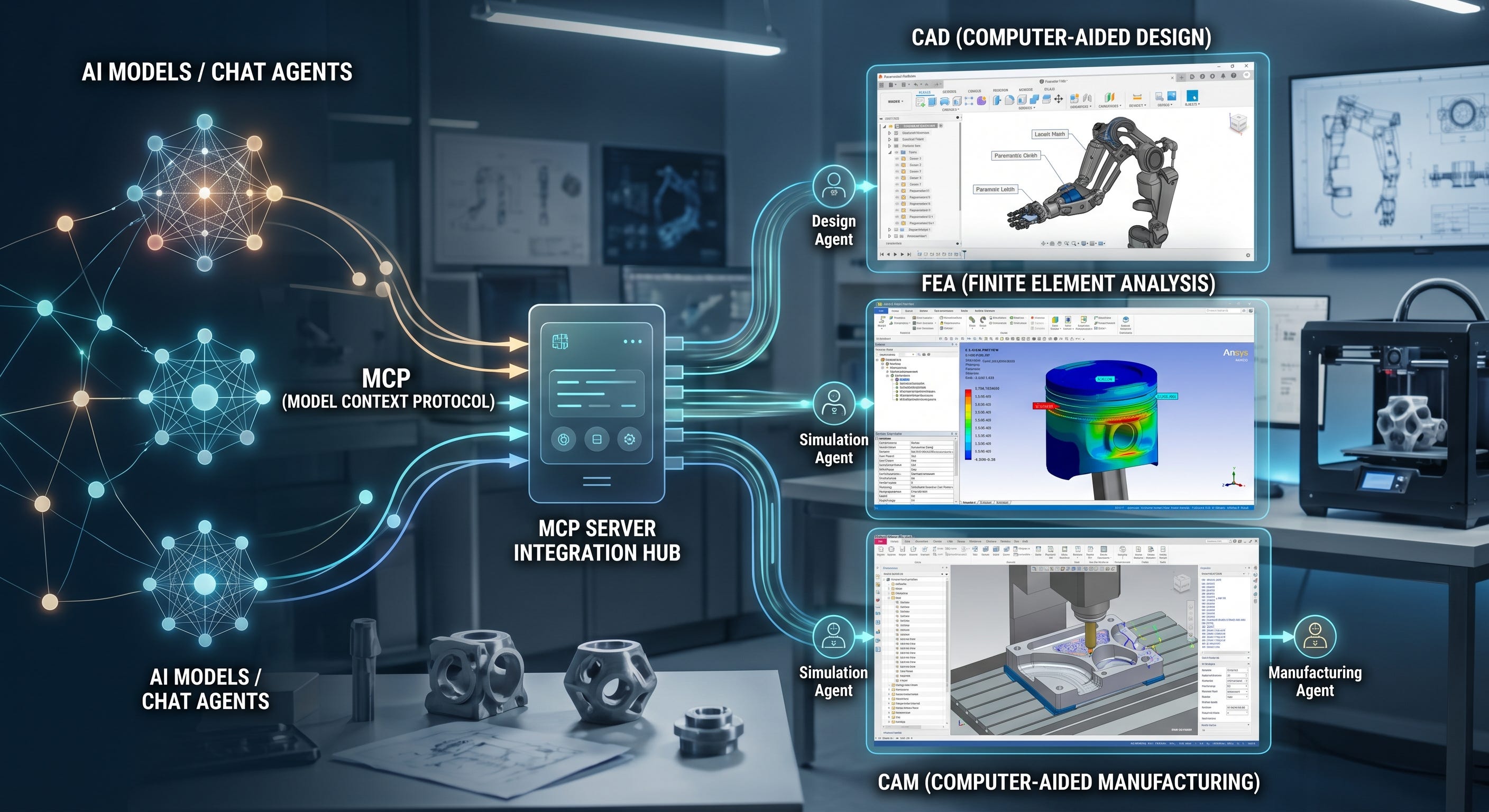
MCP enters this landscape as a unifying layer. Instead of wiring each LLM-based system directly to each engineering API, teams can build MCP servers that wrap Platform Services (PLM, cloud storage, model derivatives), local kernels (Fusion 360, FreeCAD), or industrial runtimes (WinCC, ThingWorx), and then reuse those servers across multiple agent hosts and workflows. In practice, this has led to a dense ecosystem of engineering-focused MCP servers that collectively form a control plane across the product-development stack.
2.2 MCP in CAD, CAM, FEA, and PLM
An engineering MCP survey reveals a broad pattern of adoption across the major CAD/PLM vendors. Autodesk’s ecosystem covers both cloud governance and local geometry. APS MCP servers expose Autodesk Platform Services for data management, model derivatives, and AEC/BIM endpoints, with secure service-account–based authentication and fine-grained project scoping. Separate Fusion 360 MCP servers connect directly to the desktop kernel via a high-speed socket bridge, exposing dozens of tools for sketch creation, solid modeling, sheet metal, manufacturing setups, toolpath generation, and G-code post-processing for controllers like Fanuc, GRBL, and Haas.
Siemens uses MCP both in front-end and factory contexts. The Siemens Element MCP server couples to a design system and component library, using RAG to give agents precise, versioned UI component semantics. On the factory side, the WinCC Unified MCP server bridges LLMs into SCADA runtimes, mapping semantic MCP calls into data tags, user-defined types, and alarm systems, effectively offering conversational access to plant status and historical performance. PTC’s implementations span ThingWorx (IoT/PLM cloud integration) and Onshape (cloud CAD) via MCP servers that map tools to IoT KPI actions, sensor data, parametric modeling operations, and variable tables.
Dassault’s ecosystem, constrained by legacy COM-based APIs in SolidWorks, is served by community MCP implementations that wrap COM and even dynamically generate VBA macros for complex operations, while CATIA-focused MCP prototypes integrate with SysML v2 and digital twins to orchestrate MBSE-driven verification workflows across physical robotics and virtual simulations. Open-source platforms such as FreeCAD and OpenSCAD have become MCP testbeds, with servers that not only generate parametric geometry but also orchestrate CFD and FEA simulations via OpenFOAM, CalculiX, and slicers, constructing full engineering pipelines from natural-language prompts to manufacturing outputs.
2.3 What MCP concretely enables
Taken together, these systems demonstrate that MCP can already deliver tangible automation value in product development and manufacturing. Multi-step workflows that formerly required bespoke scripts—create geometry, mesh, run FEA/CFD, extract metrics, generate BOM, build toolpaths, post-process to G-code—can now be expressed as sequences of MCP tool calls orchestrated by an agent. The same MCP servers can be reused across different hosts: a desktop AI client, a code editor, or a CI pipeline can all target the same Fusion MCP server or ThingWorx MCP server. [web:24]
Moreover, engineering MCP servers often encode domain-specific safety hints and metadata (e.g., read-only vs. destructive tools, confirmation requirements, validation layers that track volume and manifoldness of Boolean operations) that help host applications mediate risk when giving agents control over live, unsaved CAD sessions.In this sense, MCP is not just syntactic glue; it is also a place where domain knowledge and safety policies can be concentrated and surfaced to agent hosts.
3. Why Connectivity Alone Does Not Fix Engineering Workflows
3.1 The “chat-driven macro” trap
Despite the sophistication of many MCP servers, a large fraction of current deployments function as “chat-driven macros”: engineers type natural-language commands into a chat interface, and the agent orchestrates MCP tool calls behind the scenes, reporting back via text.[web:33] For simple tasks—generate a parametric model, run a canned simulation—this is an improvement over hand-written scripts. But as workflows grow more complex, the limitations are obvious: engineers need visual confirmation of geometry, rich parameter controls, and alignment with existing UIs and processes.
The result is a UX mismatch. CAD, PLM, and MES tools are visual and stateful, yet MCP’s first generation primarily delivers improved RPC semantics for tools and resources, not a way to embed rich interaction into the agent environment.[web:6][web:18][web:33] Engineers bounce between a chat window and their existing applications, copying IDs, re-checking models, and mentally reconciling the agent’s textual description with what they see on screen. MCP has standardized the “how” of tool invocation; it has not yet standardized the “how” of human–agent interaction.
3.2 Scaling and governance at the edge of safety
The scaling issues described in MCP’s own ecosystem become particularly acute in manufacturing. As organizations wire MCP servers into more sensitive systems—PLM, MES, SCADA—the combination of tool explosion, large responses, and long-running workflows increases both cost and risk.[web:38][web:40][web:41] Engineering MCP servers, by design, may expose commands that alter geometry, tooling parameters, or plant setpoints. Without robust UI, approval flows, and multi-agent oversight, handing these tools to a single generalist agent is hard to justify in a safety-critical environment.
Security analysts argue that MCP’s open-ended tool surfaces necessitate tighter governance: strong authentication, explicit scoping, and human-in-the-loop checks for destructive operations.[web:41] In practice, engineering teams are already compensating by layering their own safety protocols on top of MCP: tagging tools as destructive, requiring explicit confirmation, or restricting servers to read-only in certain contexts. These practices point toward a need for standards that address interaction and coordination more directly, rather than leaving every organization to improvise.
4. Emerging Agent Standards: webMCP, MCP‑UI, A2A, and ACP
4.1 MCP‑UI/MCP Apps: UI over MCP
Shopify’s engineering team framed a core limitation of chat-based agents as the “text wall”: even with MCP, complex workflows reduce to long, dense transcripts that are hard to navigate and act upon (MCP UI: Breaking the text wall)[web:10]. Their answer was MCP‑UI, a pattern and implementation for allowing MCP servers to return interactive UI components—cards, lists, sliders, embedded views—rather than only text and JSON.[web:10][web:15] These UI payloads, standardized under the broader “MCP Apps” concept, enable a host to render structured views inline in the chat or side panel, turning agent responses into living interfaces rather than static paragraphs.[web:10][web:21][web:6]
The open-source mcp-ui project provides server-side libraries such as @mcp-ui/server that let developers define UI resources programmatically, with schemas describing layout, actions, and bindings (mcp-ui GitHub)[web:21]. Third-party analysis by Vellum describes MCP‑UI as the “missing UI layer” that makes agentic commerce flows—search, product selection, cart management—feel like applications rather than conversations (Vellum MCP UI)[web:13]. In the same way, MCP‑UI can transform engineering interactions: instead of telling the engineer “I updated the thickness to 2.5 mm,” the server can render a 3D preview, a parameter slider, and validation messages inside the agent interface.
For product development, MCP‑UI/MCP Apps represent a way to collapse the gap between chat and tooling. A Fusion or FreeCAD MCP server could expose not only tools for geometry operations but also UI resources for previewing parts, selecting configurations, or approving changes. PLM servers could embed change-request dashboards, impact analyses, or BOM diffs directly in the agent workflow. MCP‑UI doesn’t change the underlying tool plane; it changes how that plane is exposed to humans.
4.2 webMCP: browser-native tools for agents
On the web, a different problem has emerged. Most current “browser agents” rely on visual models and synthetic events to mimic a human clicking through DOMs. This approach is fragile, opaque, and poorly aligned with modern SPA architectures.[web:23][web:26] The webMCP proposal, under development in the W3C Web Machine Learning Community Group, takes a more principled approach: it allows web pages to explicitly expose structured tools to in-tab agents, making the page itself act as an MCP-like server (webmcp GitHub, WebMCP API lesson)[web:17][web:20][web:23].
Developer-focused material describes webMCP as “MCP for the browser tab”: instead of standing up a separate backend server, client-side JavaScript registers tools (with names, parameters, and return schemas) that agents can discover and call.[web:20][web:23][web:26] Registration can be declarative, via HTML attributes, or imperative, via JS APIs. Early implementations are available behind experimental flags in Chromium-based browsers, with documentation pointing to security models and consent flows needed to keep agent actions bounded.[web:20][web:26]
For engineering applications, where many tools are now web-based—Onshape and Fusion web clients, PLM portals, MES dashboards—webMCP is a direct answer to today’s brittle web automation. A PLM UI can expose operations like createChangeRequest or linkCADModel as webMCP tools; a cloud CAD UI can expose createExtrude or updateConstraint in the same way.[web:23][web:26] Agents operating inside the browser can then interact with the application’s own abstractions instead of guessing from DOM structures. Combined with MCP‑UI, this suggests a coherent story: MCP servers back engineering kernels and data; webMCP surfaces browser-side capabilities; MCP‑UI binds them into interactive views.
4.3 A2A and ACP: multi-agent coordination
While MCP, MCP‑UI, and webMCP concern how a single agent interacts with tools and UIs, the emerging Agent2Agent (A2A) and Agent Communication Protocol (ACP) standards address a different dimension: how agents talk to each other. A2A, originally developed by Google Cloud and now a Linux Foundation project, defines a protocol for secure, interoperable communication between agents built on different frameworks and hosted by different organizations (IBM A2A overview, Linux Foundation A2A PR, A2A GitHub, Google A2A blog)[web:11][web:22][web:28][web:30]. It covers agent identity, authentication, message formats, and asynchronous conversations, allowing agents to delegate tasks or exchange information without exposing their internal tooling.[web:11][web:28]
Analyses from Auth0/Okta, Akka, and Heidloff explicitly distinguish MCP from A2A: MCP lets a single agent extend its capabilities by calling tools; A2A allows multiple agents to coordinate, each with their own tools and policies (Auth0 MCP vs A2A, Akka blog, Heidloff comparison)[web:8][web:14][web:16]. ACP, championed by IBM-related efforts, defines richer message semantics and task lifecycle constructs (e.g., propose/accept, streaming, cancellation) for multi-agent systems.[web:14][web:16] Both protocols are complementary to MCP; they operate one layer above it, concerned with who should call which tools when, under what constraints.
In a manufacturing context, this matters because real workflows are inherently multi-role: design, simulation, cost estimation, supply chain, and factory ops are distinct competencies. A multi-agent system might include a CAD agent with MCP access to geometry kernels, a simulation agent with MCP access to FEA/CFD servers, a procurement agent wired to ERP/MES MCP servers, and a safety agent responsible for enforcing constraints.[web:16] A2A/ACP provide the language for these agents to negotiate and coordinate, instead of hard-coding everything into one monolithic orchestrator.
5. Architectural Implications for Engineering Organizations
5.1 Treat MCP as the tool/control plane, not the whole stack
For product-development and manufacturing organizations, MCP is already a pragmatic way to standardize access to CAD, PLM, simulation, and plant systems. It should be treated as the tool and context plane—the way agents reach into engineering infrastructure—rather than as the complete agentic solution (MCP docs, Databricks)[web:18][web:36]. Engineering teams should prioritize building solid MCP servers around their core systems (CAD kernels, PLM repositories, MES/SCADA interfaces), with explicit scoping, safety hints, and observability.[web:41]
At the same time, teams should resist the urge to express entire workflows as opaque agent prompts that call MCP tools in ways no one else understands. Thoughtworks and others caution that moving too much application logic into prompts and tool sequences can erode architectural clarity and testability.[web:33] A better pattern is to keep domain workflows explicit—whether as MCP prompts, higher-level services, or multi-agent roles—and use MCP as the mechanism, not the design.
5.2 Plan for UI and browser-native interaction
Given the direction of MCP‑UI/MCP Apps and webMCP, engineering organizations should assume that agent interaction will become more visual and browser-native. When designing MCP servers around CAD or PLM, consider what kinds of UI resources will need to be surfaced: model previews, parameter panels, change-impact summaries, or simulation dashboards.[web:10][web:21][web:23] Similarly, for web-based tools, teams should monitor webMCP’s progress and push vendors toward exposing explicit browser-side tools rather than relying on DOM scraping or closed, non-standard “agent modes.”[web:20][web:23][web:26]
The strategic question is not “Should we use MCP or webMCP?” but “How do we design our engineering stack so that agents have a clean, standard way to act in both backend and frontend contexts?” Aligning on MCP for backend tools and webMCP for frontends, with MCP‑UI as the glue, offers a path toward that coherence.
5.3 Anticipate multi-agent protocols and governance
Finally, as organizations graduate from simple “assistant” use cases to more autonomous workflows, they should anticipate multi-agent protocols like A2A and ACP. This means thinking in terms of roles and responsibilities: which agents are allowed to change geometry, approve deviations, modify production schedules, or alter setpoints; which agents can only propose; and which act as safety or compliance gates.[web:11][web:16][web:22] A2A and ACP offer a way to encode and standardize these patterns, making them portable across vendors and host environments rather than burying them in proprietary orchestrators.[web:8][web:14][web:28]
In practical terms, that implies designing MCP servers with multi-agent use in mind: clear capabilities, least-privilege scopes, and auditable logs that can be tied back to specific agent identities. It also implies engaging with standards bodies—AAIF for MCP and AGENTS.md, W3C for webMCP, the Linux Foundation Agent2Agent project for A2A—to ensure that manufacturing use cases and safety concerns are represented.[web:2][web:5][web:17][web:25][web:30]
MCP has already broken open the sealed box of engineering software, turning closed kernels and platforms into something agents can program against. The next wave of standards—webMCP, MCP‑UI/MCP Apps, and A2A/ACP—will decide whether that access results in a thin layer of automation around legacy tools, or in a deeply integrated, agentic product-development environment where humans, agents, and systems collaborate as peers.
References
Wikipedia, “Model Context Protocol.” https://en.wikipedia.org/wiki/Model_Context_Protocol [web:6]
Model Context Protocol official docs, “Getting started / introduction.” https://modelcontextprotocol.io/docs/getting-started/intro [web:18]
Anthropic, “Introducing the Model Context Protocol.” https://www.anthropic.com/news/model-context-protocol [web:32]
Linux Foundation, “Announcing the formation of the Agentic AI Foundation.” https://www.linuxfoundation.org/press/linux-foundation-announces-the-formation-of-the-agentic-ai-foundation [web:2]
AAIF PR, “Linux Foundation Announces the Formation of the Agentic AI Foundation AAIF.” https://www.prnewswire.com/news-releases/linux-foundation-announces-the-formation-of-the-agentic-ai-foundation-aaif-anchored-by- [web:5]
Anthropic, “Donating the Model Context Protocol and establishing the Agentic AI Foundation.” https://www.anthropic.com/news/donating-the-model-context-protocol-and-establishing-of-the-agentic-ai-foundation [web:9]
Pragmatic Engineer, “MCP Protocol: a new AI dev tools building block.”

[web:34]
Thoughtworks, “The Model Context Protocol: Getting beneath the hype.” https://www.thoughtworks.com/en-us/insights/blog/generative-ai/model-context-protocol-beneath-hype [web:33]
Victor Dibia, “No, MCP’s have NOT won (Yet).”

[web:35]
Anthropic, “Code execution with MCP: building more efficient AI agents.” https://www.anthropic.com/engineering/code-execution-with-mcp [web:38]
Red Hat, “Model Context Protocol (MCP): Understanding security risks and controls.” https://www.redhat.com/en/blog/model-context-protocol-mcp-understanding-security-risks-and-controls [web:41]
GitHub Blog, “MCP joins the Linux Foundation: what this means for developers.” https://github.blog/open-source/maintainers/mcp-joins-the-linux-foundation-what-this-means-for-developers-building-the-next-era- [web:3]
Chrome Developers, “Chrome DevTools (MCP) for your AI agent.” https://developer.chrome.com/blog/chrome-devtools-mcp [web:19]
GitHub Blog, “A practical guide on how to use the GitHub MCP server.” https://github.blog/ai-and-ml/generative-ai/a-practical-guide-on-how-to-use-the-github-mcp-server/ [web:24]
Shopify Docs, “About Storefront MCP.” https://shopify.dev/docs/apps/build/storefront-mcp [web:7]
Shopify Engineering, “MCP UI: Breaking the text wall with interactive components.” https://shopify.engineering/mcp-ui-breaking-the-text-wall [web:10]
MCP‑UI Org, “mcp-ui: UI over MCP SDK.” https://github.com/MCP-UI-Org/mcp-ui [web:21]
Vellum, “MCP UI & The Future of Agentic Commerce.” https://www.vellum.ai/blog/mcp-ui-and-the-future-of-agentic-commerce [web:13]
webmachinelearning, “webmcp” GitHub repository. https://github.com/webmachinelearning/webmcp [web:17]
Developer lesson, “What is the WebMCP API?” https://m.academy/lessons/webmcp-api/ [web:20]
Scalekit, “WebMCP explained: How browser agents can call web apps directly.” https://www.scalekit.com/blog/webmcp-the-missing-bridge-between-ai-agents-and-the-web [web:23]
nohacks.co, “What is WebMCP? Your website just became a function.” https://nohacks.co/blog/what-is-webmcp [web:26]
A2A Project, “Agent2Agent (A2A) protocol.” https://github.com/a2aproject/A2A [web:28]
Linux Foundation, “Launches the Agent2Agent protocol project to enable secure intelligent collaboration.” https://www.linuxfoundation.org/press/linux-foundation-launches-the-agent2agent-protocol-project-to-enable-secure-intelligent-co [web:22][web:25]
Google Developers Blog, “Google Cloud donates A2A to Linux Foundation.” https://developers.googleblog.com/en/google-cloud-donates-a2a-to-linux-foundation/ [web:30]
IBM, “What is A2A protocol (Agent2Agent)?” https://www.ibm.com/think/topics/agent2agent-protocol [web:11]
Auth0/Okta, “MCP vs A2A: A guide to AI agent communication protocols.” https://auth0.com/blog/mcp-vs-a2a/ [web:8]
Akka, “MCP, A2A, ACP: What does it all mean?” https://akka.io/blog/mcp-a2a-acp-what-does-it-all-mean [web:14]
Heidloff, “Comparison of Agent Protocols MCP, ACP and A2A.” https://heidloff.net/article/mcp-acp-a2a-agent-protocols/ [web:16]
Credal, “What is the Agentic Artificial Intelligence Foundation (AAIF)?” https://www.credal.ai/blog/what-is-the-agentic-artificial-intelligence-foundation-aaif [web:37]
Databricks, “What is the Model Context Protocol (MCP)?” https://www.databricks.com/blog/what-is-model-context-protocol [web:36]
MCP GitHub, “Response size limit for MCP responses to prevent context issues.” https://github.com/modelcontextprotocol/modelcontextprotocol/discussions/2211 [web:40]
A very good review. We’ve been experimenting with MCP in OpenBOM and released the first version of it. I’m afraid, companies don’t know (yet) what to do about it and how does it fit the broader workflow. What is your take? Did you try to implement some specific use cases or just plain CRUD?